Olivi - Google Slide Template for Professionals
In the fast-paced world of modern communication, the quality of your presentation often determines the success of your message. Whether you are pitching a startup to investors, teaching a complex concept to students, or reporting quarterly results to stakeholders, the visual framework you choose sets the tone before you even speak. The Olivi - Google Slide Template addresses this critical need by offering a robust, versatile design system built specifically for the Google Slides environment. It is not merely a collection of slides; it is a strategic tool designed to streamline your workflow and elevate the professional standard of your digital storytelling.
Many professionals struggle with the dual challenge of maintaining aesthetic consistency while managing tight deadlines. Custom designing every slide from scratch consumes valuable time that could be better spent refining content or preparing for delivery. Olivi solves this friction by providing a pre-engineered structure where all elements are fully editable. You can input your specific content, replace placeholder images with your own branding assets, and adjust color schemes to match your corporate identity without needing advanced graphic design skills. This flexibility ensures that your final output looks bespoke rather than generic.
Streamlining Workflow with Master Slides and Vector Graphics
One of the most significant advantages of using the Olivi template lies in its technical foundation. Built on vector-based master slides, the design remains crisp and clear at any resolution, which is essential for widescreen displays common in modern conference rooms and remote meeting setups. Unlike raster images that pixelate when zoomed or resized, vector graphics ensure that charts, icons, and diagrams retain their sharpness. This technical precision matters when you are presenting detailed data visualizations that require clarity.
The master slide architecture allows for efficient global updates. If you decide to change a font style or reposition a logo across your entire deck, you can do so in one place, and the changes propagate automatically to all 150 total slides included in the package. This feature is particularly beneficial for large-scale projects where consistency is paramount. For example, a marketing team launching a new product line can maintain brand compliance effortlessly, ensuring that every slide adheres to the company's visual guidelines without manual intervention on each individual page.
Five Premade Colors for Diverse Brand Identities
Brand alignment is a frequent pain point for freelancers and small business owners who may not have access to a dedicated design team. Olivi addresses this by including five premade color variations within the same file structure. These distinct palettes allow users to instantly adapt the presentation to different contexts or client requirements. A financial advisor might prefer a conservative blue scheme to convey trust, while a creative agency might opt for a vibrant palette to stimulate innovation.
This versatility extends beyond simple aesthetics. By having multiple color options readily available, you can create cohesive sub-presentation decks for different departments or audiences without starting over. The ability to switch themes quickly supports agile workflows, enabling you to pivot your strategy based on feedback or changing project scopes. Furthermore, because these colors are integrated into the master slides, they interact seamlessly with the recommended free web fonts, ensuring that text readability and visual hierarchy remain intact regardless of the chosen theme.
Enhancing Engagement with Animated Transitions
A static presentation can sometimes fail to capture attention in an era of short attention spans. Olivi includes animated slides designed to guide the audience through your narrative flow naturally. These animations are not merely decorative; they serve a functional purpose by revealing information progressively, which helps prevent cognitive overload. When discussing complex processes or step-by-step methodologies, animating the appearance of bullet points or diagram components allows the presenter to control the pace of information delivery.
For educators and trainers, this feature is invaluable. It transforms a lecture from a passive reading experience into an interactive session where the visual elements appear in sync with the spoken explanation. Similarly, entrepreneurs pitching to venture capitalists can use these transitions to build suspense and highlight key metrics at the precise moment they are discussed. The animations are pre-configured to work smoothly within Google Slides, eliminating the need for complex coding or external plugins that might cause compatibility issues during live presentations.
Practical Applications Across Industries
The utility of the Olivi template spans a wide range of professions due to its balanced approach between structure and creativity. For entrepreneurs, the 30 useful slides provide a solid backbone for pitch decks, covering essential sections like problem statements, solutions, market analysis, and financial projections. The drag-and-drop functionality simplifies the insertion of custom charts and graphs, allowing founders to focus on the substance of their business model rather than formatting struggles.
Marketers and bloggers benefit from the template's ability to showcase visual-heavy content. The layout accommodates high-resolution imagery and infographics effectively, making it ideal for campaign reviews or social media strategy presentations. Educators and trainers find the structured layouts helpful for lesson planning and course materials, ensuring that educational content is presented in an organized, digestible format. Even hobbyists and publishers can leverage the clean design to present portfolios or book proposals with a level of polish that commands respect.
Efficiency Through Included Resources
Time is a finite resource, and the Olivi template is designed to maximize productivity. The package includes five Google Slide files, each representing a different color variation, along with comprehensive readme information to guide users through customization. This documentation acts as a quick-start guide, reducing the learning curve for those unfamiliar with advanced slide editing techniques. By providing a "readme first" approach, the template empowers users to hit the ground running, minimizing trial and error.
The inclusion of recommended free web fonts further enhances efficiency. Often, designers spend hours sourcing typography that matches their brand. Olivi curates a selection of accessible, professional fonts that are easy to integrate and render correctly across devices. This attention to detail ensures that your presentation looks consistent whether viewed on a laptop, tablet, or projected onto a large screen. The widescreen format is also optimized for modern aspect ratios, preventing awkward black bars or cropped content that can detract from professionalism.
Considerations for Customization and Fit
While Olivi offers extensive flexibility, it is important to recognize that no single template fits every scenario perfectly. Users should evaluate their specific needs before committing to a design system. If your organization has extremely strict brand guidelines that deviate significantly from the five premade colors, you may need to invest additional time in adjusting the color codes manually. However, the vector-based nature of the graphics makes this process manageable compared to templates with fixed image backgrounds.
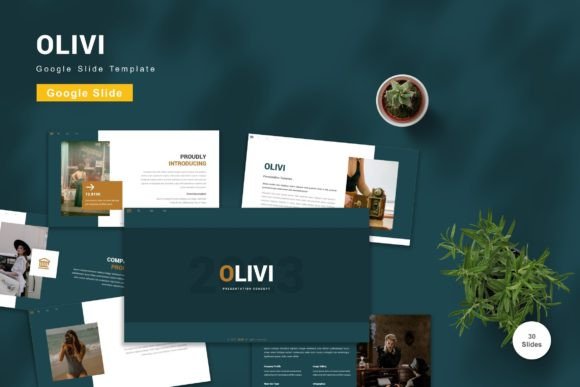
Additionally, while the preview images give a strong indication of the design style, it is worth noting that these previews are not included in the final download. Users must supply their own imagery to complete the look. This requirement encourages originality but means you should have a library of relevant photos and graphics ready before beginning your edit. For those who rely heavily on stock photography, the placeholder system makes swapping images straightforward, but the quality of your final presentation will ultimately depend on the quality of the assets you choose to insert.
Final Thoughts on Professional Presentation Tools
The decision to use a premium template like Olivi is an investment in your communication effectiveness. In a competitive landscape, the difference between a memorable presentation and a forgettable one often comes down to execution. By leveraging a tool that combines ease of use with professional design standards, you free yourself to focus on what truly matters: your message and your audience. Whether you are a seasoned executive or a budding freelancer, the ability to produce high-quality slides quickly can be a significant advantage.
Ultimately, the value of Olivi lies in its balance of structure and freedom. It provides a reliable framework that handles the technical complexities of design, allowing you to pour your energy into content creation and delivery. As you navigate the demands of business and personal projects, having a dependable resource for your visual communications can simplify decisions and improve outcomes. Get it now Olivi - Google Slide Template for All Business and Personal Needs to ensure your next presentation stands out for the right reasons.