Diona - Google Slide Template for All Needs
Creating a presentation that truly captures attention often feels like a balancing act between design and content. Many professionals, educators, and entrepreneurs spend hours tweaking layouts only to end up with something that looks generic or cluttered. The Diona - Google Slide Template solves this problem by offering a comprehensive, ready-to-use framework designed for both business and personal needs. Whether you are pitching a startup idea to investors, teaching a complex topic to students, or organizing a family reunion slideshow, this template provides the structural foundation you need to focus on your message rather than formatting.
At its core, Diona is built on the principle of flexibility. Every element within the slides is fully editable, allowing you to input your specific content, replace placeholder images with your own visuals, and adjust color schemes to match your brand identity. This level of customization ensures that your final presentation feels unique and tailored, even though it starts from a professional base. With 150 total slides included in the package, you have an extensive library of layouts to choose from, covering everything from simple text introductions to complex data visualizations.
Why Choose a Master Slide-Based Design?
One of the most significant advantages of the Diona template is its reliance on vector-based master slides. For beginners, this might sound technical, but the benefit is straightforward: consistency and ease of editing. When a template is master slide-based, changing a font style, a logo position, or a background color on one slide automatically updates those elements across the entire deck. This saves immense amounts of time and eliminates the risk of accidental inconsistencies that can make a presentation look unprofessional.
Unlike static templates where every slide must be edited individually, Diona allows for a "drag and drop" workflow. You can simply select a layout, insert your text, and swap out images without worrying about breaking the design. This intuitive approach makes it accessible for casual users who may not have formal training in graphic design, while still offering enough depth for experienced creators who need precise control over their visual storytelling.
Tailored for Every Audience and Purpose
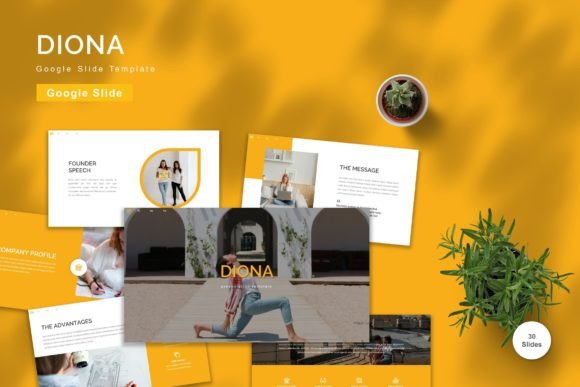
The versatility of the Diona - Google Slide Template lies in its ability to adapt to various contexts. In a business setting, the widescreen format ensures that your charts, graphs, and key metrics are displayed clearly on modern projectors and large monitors. The inclusion of 30 useful slides specifically designed for common business scenarios—such as team introductions, financial overviews, and project timelines—means you won't have to start from scratch for routine meetings.
For educators and freelancers, the template offers a clean, distraction-free environment that keeps the audience focused on the material. The recommended free web fonts are selected for readability, ensuring that your text remains legible even when viewed from the back of a lecture hall or a video conference screen. Furthermore, the five premade color options allow you to instantly shift the tone of your presentation. A vibrant palette might work well for a creative brainstorming session, while a muted, professional scheme is better suited for a formal board review.
Personal projects also benefit from the structure provided by Diona. Imagine planning a wedding, organizing a community event, or creating a portfolio for a hobbyist project. These occasions often require a polished look that reflects effort and care. By using a high-quality template, you ensure that your personal presentations stand out just as much as corporate ones. The animated slides included in the package add a dynamic layer to your storytelling, helping to maintain engagement during longer sessions.
Key Features That Enhance Your Workflow
When evaluating presentation tools, the feature set determines how smoothly you can execute your vision. Diona comes packed with resources designed to streamline your workflow. Here is what you get:
- 150 Total Slides: A vast collection of layouts ensures you have a design for every type of content, from bullet points to full-screen imagery.
- Five Premade Colors: Instantly switch themes to match your branding or mood without needing to recolor every element manually.
- Vector-Based Graphics: High-quality icons and shapes that scale perfectly without losing resolution, regardless of screen size.
- Animated Transitions: Built-in animations help guide the audience's eye and add a professional polish to your delivery.
- Widescreen Format: Optimized for 16:9 displays, which is the standard for most modern screens and projectors.
Additionally, the package includes five separate Google Slide files, each corresponding to a different color theme. This means you can download the version that best fits your initial concept and begin working immediately. The inclusion of a detailed "Readme First" document ensures that even first-time users can navigate the file structure and understand how to utilize the master slides effectively.
Practical Considerations Before You Begin
While the Diona template offers a robust solution, there are a few practical things to consider before diving in. First, remember that the preview images shown in marketing materials are for demonstration purposes only and are not included in the downloadable files. You will need to provide your own photos and graphics to complete the look. This is actually a benefit, as it prevents copyright issues and ensures your content is original.
Secondly, because the template uses recommended free web fonts, you should ensure that these fonts are installed or linked correctly within your Google Slides account for the best results. While Google Slides usually handles this automatically, verifying your font settings can prevent unexpected formatting shifts if you share the file with others who do not have the same setup.
Finally, take advantage of the "drag and drop" nature of the design. Do not feel pressured to use all 150 slides. Instead, curate the 30 most useful slides that fit your specific narrative. A concise, well-structured presentation is always more effective than a lengthy one filled with unnecessary information. Use the variety of layouts to break up monotony, but keep your core message front and center.
Getting Started with Your Presentation
Transitioning from a blank canvas to a finished product is significantly easier with the right tools. The Diona - Google Slide Template removes the friction of design, allowing you to channel your energy into crafting compelling stories and delivering impactful messages. Whether you are a small business owner looking to expand your client base, a teacher aiming to engage a restless class, or a hobbyist sharing your latest passion project, this template provides the professional edge you need.
By combining ease of use with high-quality design principles, Diona bridges the gap between amateur attempts and professional standards. It respects your time by offering pre-built solutions while respecting your creativity by remaining fully customizable. As you explore the 150 slides and experiment with the five color themes, you will find that creating a standout presentation is less about technical skill and more about having the right foundation.
Ready to elevate your next meeting, lesson, or event? Explore the features, customize the layouts, and let your content shine with a design that works as hard as you do. The path to a memorable presentation starts with a single click.