Equra Keynote: Elevate Your Presentations
In the fast-paced world of professional communication, the difference between a forgotten pitch and a signed contract often comes down to how clearly and compellingly an idea is presented. For professionals ranging from seasoned entrepreneurs to freelance educators, the quality of visual aids can make or break a meeting. This is where Equra Keynote becomes a vital tool in your creative arsenal. It is not merely a collection of slides; it is a structured framework designed to streamline the presentation process, allowing you to focus on your message rather than struggling with design mechanics.
Many creators find themselves stuck in a cycle of spending hours tweaking fonts, aligning boxes, and searching for the right color palette. The result is often a disjointed deck that fails to convey authority. Equra Keynote addresses this friction by offering a comprehensive solution where every element is editable. Whether you are inputting complex data, replacing placeholder images with your own branding, or adjusting colors to match your company identity, the template adapts to your needs instantly. This flexibility ensures that your final output feels bespoke, even though it was built on a pre-designed foundation.
Streamlining Workflow with Vector-Based Master Slides
The core strength of the Equra Keynote template lies in its technical architecture. Built on vector-based master slides, it offers a level of scalability that raster-based images simply cannot match. When you resize a chart or move a graphic within a standard image file, the quality degrades. With vector graphics, clarity remains pristine regardless of the screen size or projection resolution. This is particularly crucial for widescreen presentations, which are now the industry standard for modern conference rooms and remote video calls.
For business owners and marketers, time is the most valuable resource. The "drag and drop" functionality inherent in this template significantly reduces the time spent on formatting. Instead of manually positioning text boxes on fifty different slides, you utilize the master slide system to apply changes globally. If you decide to change the primary font or adjust the header alignment, doing so once in the master view updates the entire deck. This efficiency allows you to pivot quickly when client feedback requires last-minute adjustments, ensuring you never miss a deadline due to design bottlenecks.
Tailoring Visual Identity with Premade Color Schemes
Visual consistency is a hallmark of professional communication. A presentation that jumps between clashing colors or inconsistent styles distracts the audience and undermines your credibility. Equra Keynote solves this by providing five premade color schemes. These palettes are carefully curated to be visually harmonious, yet distinct enough to suit various industries. A tech startup might prefer a sleek, high-contrast dark theme, while a healthcare educator might opt for a softer, more calming palette.
The ability to switch between these five premade colors instantly allows for rapid prototyping. You can present the same content in two different visual contexts to see which resonates better with your specific audience. Furthermore, because the template is fully editable, you are not locked into these choices forever. If your brand guidelines require a specific hex code, you can easily replace the existing colors without breaking the layout. This balance of structure and freedom supports both strict corporate branding and the creative experimentation needed for personal projects.
Maximizing Content Impact with 150 Total Slides
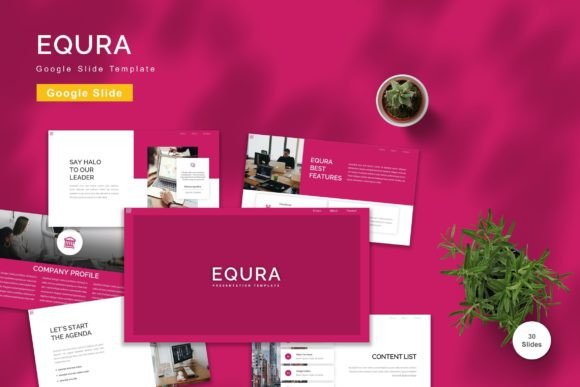
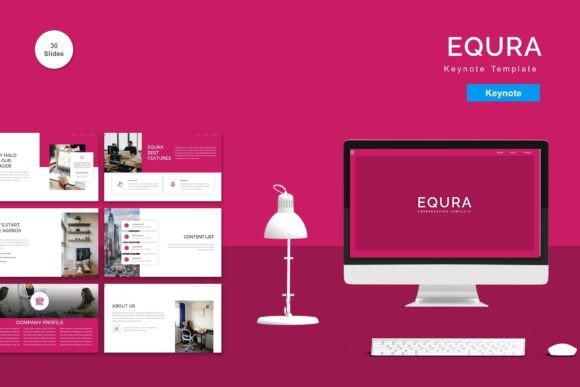
One of the most common challenges in presentation design is finding the right slide layout for specific types of content. Do you have a timeline? A comparison chart? A team introduction? Creating these layouts from scratch is tedious. The Equra Keynote package includes 150 total slides, featuring 30 useful, distinct slide layouts. This extensive library covers almost every scenario a presenter might encounter, from financial reports to product roadmaps.
Consider a small business owner preparing an investor pitch. They need to show market analysis, revenue projections, and a competitive landscape. Rather than designing three separate charts, they can select the appropriate pre-built layouts from the 30 useful slides included in the template. Each layout is optimized for readability and visual hierarchy, guiding the viewer's eye to the most important information. This ensures that your data is not just displayed, but understood immediately.
Similarly, educators and trainers benefit from the variety of layouts available. Whether explaining a complex concept through a step-by-step process diagram or showcasing student work with a gallery-style slide, the template provides a ready-made structure. This variety prevents the monotony of repetitive slides, keeping the audience engaged throughout the duration of the talk. The inclusion of animated slides further enhances this engagement, adding a dynamic layer to static information without requiring advanced animation skills.
Ensuring Accessibility with Free Web Fonts
A frequent pitfall in using downloaded templates is the reliance on proprietary fonts that may not be installed on all computers. This often leads to broken layouts or unexpected font substitutions when presenting on a different machine. Equra Keynote avoids this issue by utilizing recommended free web fonts. These fonts are widely supported and render consistently across different operating systems and devices.
This attention to detail speaks to the professionalism of the template. It ensures that what you see on your screen is exactly what your audience sees on the projector. For freelancers who travel frequently or work remotely with clients, this reliability is essential. It eliminates the anxiety of "will the font load?" and allows you to focus entirely on delivering your speech with confidence.
Practical Applications for Diverse Professionals
The versatility of Equra Keynote makes it suitable for a wide range of users. Entrepreneurs can use it to pitch ideas to venture capitalists, leveraging the clean, modern aesthetic to project stability and vision. Marketers can create campaign briefs that are visually striking and easy to digest. Bloggers and publishers can use the templates to summarize research findings or launch new products to their email lists.
Even hobbyists and educators find value in this tool. A teacher preparing a lesson plan can use the animated slides to keep students interested, while a community leader can organize event details clearly and professionally. The fact that the template includes a "Readme First" document ensures that even those with limited design experience can navigate the files effectively. The instruction set guides users through the setup, making the transition from novice to proficient presenter much smoother.
Understanding Limitations and Fit
While Equra Keynote offers a robust solution for many, it is important to understand its scope. The preview images mentioned in the documentation are not included in the download, meaning users must source their own photography and graphics. This is a standard practice in template design to avoid licensing issues, but it does require the user to have access to stock photo libraries or original assets. Additionally, while the template is highly customizable, it is designed for Keynote specifically. Users working exclusively in PowerPoint or Google Slides will need to look for alternative formats or convert the files, which may sometimes alter the layout slightly.
It is also worth noting that while the template provides a strong foundation, it does not replace the need for clear content. A beautiful slide cannot fix a confusing argument. The template is a vehicle for your ideas, not the driver. Users should approach it as a tool to enhance their storytelling, not a substitute for thorough preparation. However, for those willing to put in the effort to customize the content, the return on investment in terms of time saved and professional polish gained is substantial.
Final Thoughts on Professional Presentation Design
In an era where digital presence defines success, the tools you choose matter. Equra Keynote stands out as a practical, efficient, and aesthetically pleasing option for anyone looking to improve their presentation game. By combining 150 total slides, vector-based precision, and ease of editing, it removes the barriers to creating high-quality visual stories. Whether you are closing a deal, teaching a class, or sharing a personal passion, having a reliable template like Equra ensures that your message is delivered with the impact it deserves. It transforms the daunting task of slide creation into a streamlined process, empowering you to present with confidence and clarity.